W-8BEN-E for Amazon Sellers: Fill It Online (Companies)
This article was created with AI assistance and has not been reviewed by a human editor. It is provided for general informational purposes only and does not constitute tax, legal, or financial advice.
If your Amazon account is in a company name outside the United States, Amazon’s tax interview usually points you to IRS Form W-8BEN-E—not the individual W-8BEN. That certificate tells Amazon how to treat your entity for US withholding and reporting, so Amazon can treat the company as a foreign seller.
Completing the Amazon W-8BEN-E flow correctly matters because, without a valid form, Amazon cannot treat the company as foreign: it suspends selling privileges and can hold disbursements until the interview is done. Product sales are not income US withholding applies to, so there is no 30% to reduce; a treaty claim matters only for royalty income.
This page is written for finance leads and founders who searched for w8ben e amazon, amazon w8ben e form, or amazon tax form non us company and need a practical path forward. Below you will find a quick answer block, the guided wizard, a withholding explainer without fake guarantees, and an FAQ that mirrors what sellers ask in forums—then the same W-8BEN-E generator our customers use to produce a ready-to-sign PDF.
 AI-generated image
Do Amazon sellers need a W-8BEN-E?
Yes—when Amazon pays a non-US company (including many Ltd, GmbH, UAB, and similar entities), the Tax Information Interview builds Form W-8BEN-E and signs it electronically. Upload or mail a signed PDF only if Amazon asks. Sole proprietors taxed as individuals usually use W-8BEN instead.
Think of the certificate as the way your company swears, under penalties of perjury, that the facts Amazon sees in your profile line up with IRS categories for withholding and FATCA reporting. Until that alignment exists, automated systems often assume the conservative path.
- Who needs it: foreign corporations, LLCs, and other entities receiving US-source marketplace or royalty-style payments in the entity’s name—not the individual owner’s personal W-8BEN.
- If you do not submit a complete form, Amazon may withhold at conservative default rates on amounts subject to Chapter 3 withholding and can pause or limit payouts until tax information is fixed.
- Typical outcome after a valid W-8BEN-E: Amazon can document a treaty-based reduced rate where your certifications support it, or apply statutory rates when no treaty claim applies—exact numbers depend on your country, entity type, and how Amazon classifies each payment stream.
W-8BEN-E for Amazon in your country
Select your country to see country-specific guidance.
Generate Your W-8BEN-E for Amazon (Step-by-Step)
You do not need to memorize IRS instructions or guess which FATCA checkbox applies. The W8GetEasy wizard asks plain-language questions, branches to the sections that matter for your entity, and builds a formatted PDF that shows what to answer in Amazon’s interview, field by field. Upload or mail that signed PDF only if Amazon asks.
The process is the same guided flow we use on our dedicated W-8BEN-E page: answer step by step, download when you are ready. Form generation is a $30 one-time payment, including your downloadable PDF.
Because Amazon reconciles your certificate against the legal name and address on the account, the wizard emphasizes consistency: what you type should match Seller Central, your bank KYC, and your invoices. That attention to detail is what keeps w8ben e for amazon sellers projects moving quickly instead of bouncing between support tickets.
W-8BEN-E wizard (companies)
For an organization
For companies, funds, partnerships registered outside the USA.
Free to start. Payment is only required at the final step to download your completed PDF.
Loading...
What is the W-8BEN-E form for Amazon sellers?
Form W-8BEN-E is the IRS certificate foreign entities file with US payers such as Amazon. It combines basic company facts (legal name, address, country of formation, tax identifiers where required) with certifications about Chapter 3 status (how the IRS classifies the entity for withholding on US-source income) and Chapter 4 / FATCA status (how the entity is categorized for information-reporting rules).
Amazon collects this because US rules require payers to document whether recipients are US or foreign persons and what withholding rate applies before releasing certain payments. For a non-US company selling on Amazon, the Tax Information Interview builds the W-8BEN-E and signs it electronically. A signed PDF is the fallback only if Amazon asks, not the usual path instead of an individual W-8BEN.
The interview questions you see in Seller Central are Amazon’s way of gathering the same story the PDF tells: who the beneficial owner is, where it is organized, and whether treaty benefits are claimed. You still need a clean PDF with a real signature when that is what Amazon requests—copy-pasting guesses into text fields without understanding the certifications creates audit risk later.
US companies file different paperwork; this page is only for foreign businesses that need the W-8BEN-E for Amazon in their legal entity name.
Who needs to submit W-8BEN-E to Amazon?
Treat this as a practical checklist—not tax advice. Amazon’s own prompts decide what they will accept, but these profiles almost always map to W-8BEN-E rather than W-8BEN:
- Non-US companies with Seller Central accounts registered in the business name (including single-member entities treated as corporations or partnerships for US purposes).
- FBA and remote fulfilment sellers using a foreign corporation or LLC as the account holder.
- Kindle Direct Publishing or other Amazon publishing accounts where royalties are paid to a non-US company rather than an individual.
- Brand owners, agencies, or vendors invoicing Amazon through an offshore entity when Amazon requests entity-level tax certification.
Worked example: a UK kitchenware company selling FBA on Amazon
Thackeray Home Ltd sells kitchenware through Fulfillment by Amazon from its warehouse in Sheffield, with a growing share of US-marketplace sales. Income from selling goods isn't the kind of payment US withholding applies to.
Amazon builds the W-8BEN-E from the company's answers in the Tax Information Interview, and a director signs it electronically. Product sales need no treaty claim, so Part III stays blank. Without a valid form Amazon suspends selling privileges until the interview is done. The form stays valid through 31 December of the third year after it is signed.
- No valid form: selling privileges suspended until the interview is done — 30% never applied to product sales.
- Tax Information Interview completed, Part III blank: foreign status on file — still reportable to HMRC as normal.
Amazon sales on your UK Corporation Tax return
Amazon sales income must be reported to HMRC regardless of what happens on the US side, and the company still needs its usual Companies House filings.
If a meaningful share of your inventory, staff, or fulfilment operations end up physically located in the US (for example, US-based FBA prep or a US warehouse you control directly), that presence can be a permanent establishment. Confirm your specific structure with an accountant.
- Keep the signed W-8BEN-E and any 1042-S issued by Amazon with your company tax records.
- Report Amazon sales income through normal UK Corporation Tax filings, regardless of US withholding treatment.
- Reassess whether a US warehouse, US-based staff, or a US fulfilment partner with decision-making authority creates a permanent establishment.
What tax does Amazon withhold from non-US companies?
For product sales, nothing. Income from selling goods is not the fixed or periodic US-source income that carries 30% Chapter 3 withholding, so Amazon does not withhold on a foreign company's sales and Part III stays blank.
The 30% rate applies to US-source royalties, dividends and interest. If Amazon pays the company royalties — for example through a publishing programme — the W-8BEN-E is where the company claims its treaty's royalties rate.
Without a valid W-8BEN-E the risk is the account, not a rate: Amazon suspends selling privileges until the interview is done.
If the company keeps stock, staff or an office of its own in the US, that can be a permanent establishment — check that with an accountant.
How to fill out W-8BEN-E for Amazon (step-by-step)
Think of the form as five big checkpoints that mirror what Amazon’s tax interview asks for, even if the UI order differs slightly. Sellers who google how to fill w8ben e amazon usually need a map before touching the PDF—use the list below as that map, then open the wizard when you are ready to answer field-level questions.
Step 1 – Company details
Enter the legal entity name, mailing address, and employer identification or foreign tax ID fields exactly as they appear on formation documents and your Amazon legal profile. Typos here are a common reason payers reject uploads.
Step 2 – Country of incorporation
Select the jurisdiction where the entity was formed. This drives treaty availability and helps Amazon confirm you are certifying as a foreign entity, not a US domestic corporation.
Step 3 – FATCA status
Chapter 4 asks whether the entity is a financial institution, passive foreign corporation, active trade or business, publicly traded issuer, or another listed category. Pick the path that matches real operations—misclassification can invalidate the whole certificate.
Step 4 – Treaty claim
If you qualify, identify the treaty country, articles, income type, and rate you are claiming. If you are not claiming benefits, certify that instead of copying forum examples from other sellers.
Step 5 – Signature
An authorized officer signs under penalties of perjury, dates the form, and confirms capacity to bind the entity. Amazon typically requires this before activating reduced withholding settings.
Common mistakes when filling W-8BEN-E for Amazon
These issues show up constantly in seller forums because the form is long and Amazon’s UI compresses complex ideas into short questions.
- Choosing the wrong Chapter 3 entity type because a local label like “Ltd” was assumed to equal “corporation” for US tax purposes.
- Making a treaty claim for product sales. They need none — Part III stays blank. A claim matters only for royalties, under the royalties article.
- Treating all Amazon payouts as one income bucket—marketplaces can split streams, and your certifications must match each claim you make.
- Selecting a limitation-on-benefits narrative or active-trade exception without confirming the entity actually meets the tests described in the form instructions.
Sample: Thackeray Home Ltd's W-8BEN-E for Amazon
Thackeray Home Ltd's UK company number is on line 9b and Part III is blank.
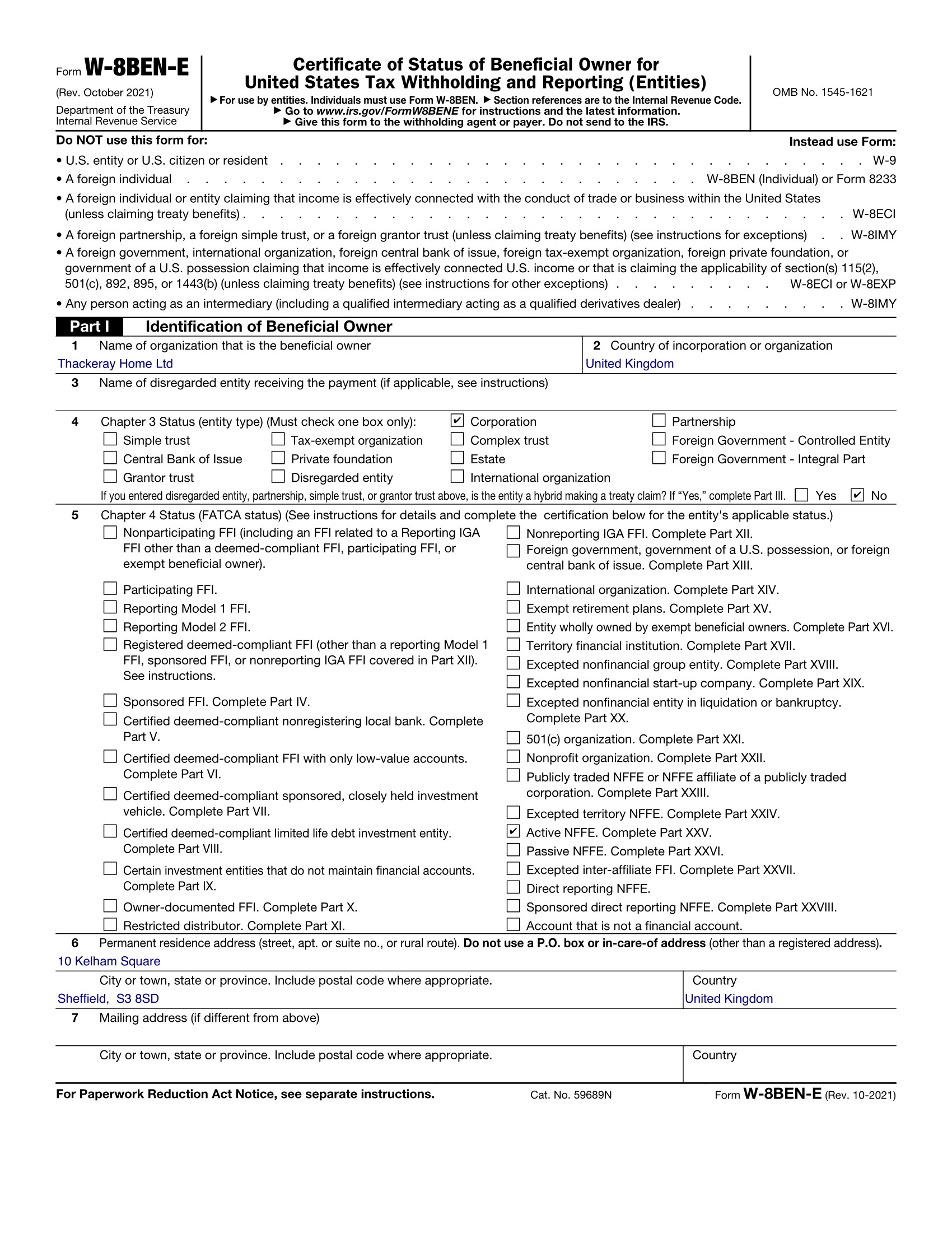
Example only. Thackeray Home Ltd, 10 Kelham Square, Sheffield S3 8SD, is fictional.
Related guides on W8GetEasy
Want the broader W-8BEN-E walkthrough without the Amazon framing? Visit our main entity landing for deeper context on Chapter 3, Chapter 4, and withholding. Selling as yourself—not a company? The individual path uses Form W-8BEN; start from that page instead.
Fill your W-8BEN-E for Amazon in minutes
Skip blank-PDF guesswork. Answer guided questions tailored to foreign companies, preview the output, then download a formatted W-8BEN-E you can sign and upload. Fast checkout, clear steps, and no IRS jargon without explanations.
Start Now ($30)FAQ
Do I need W-8BEN-E for Amazon if I sell as a company?
Usually yes. When disbursements and tax reporting run through a non-US legal entity, Amazon’s compliance flow expects Form W-8BEN-E. Individuals operating in their own name generally file W-8BEN. If you are unsure whether Amazon views you as an entity or an individual, check the legal name on your tax interview and your formation documents—they should match the form you choose.
What happens if I do not submit the form?
Amazon may continue to apply default withholding on payments that require documentation, hold disbursements, or block account features until you complete the tax interview. The exact messages depend on your marketplace and region, but the underlying issue is the same: without a valid certificate, the platform cannot confirm a reduced treaty rate or consistent FATCA classification.
Is W-8BEN-E the same as W-8BEN?
No. W-8BEN certifies foreign individuals. W-8BEN-E certifies foreign entities and includes FATCA sections that do not appear on the individual form. Uploading the wrong certificate can delay approvals because automated checks compare your legal entity type to the form type.
How long is W-8BEN-E valid?
Generally, a signed W-8BEN-E stays effective until the last day of the third calendar year after signing unless a change in circumstances makes it incorrect sooner. You must submit a new form when entity name, address, tax classification, treaty claims, or FATCA status changes. Amazon may also prompt for refresh independent of the IRS validity window.
Can Amazon reject my W-8BEN-E?
Yes. Automated and manual reviews can reject forms when names do not match the account, signatures are missing, entity types conflict with public records, or treaty claims look inconsistent with the certifications. Fix the flagged fields and complete the Tax Information Interview again. Upload or mail a new signed PDF only if Amazon asks.
Does W-8BEN-E reduce my tax to zero automatically?
For product sales, a valid W-8BEN-E is what keeps withholding at zero — no treaty claim needed. Income from selling goods is not the kind of payment US withholding applies to, and Amazon does not withhold on the sales of a seller with a valid W-8. Without a valid form, Amazon suspends selling privileges until the interview is done — the sales still carry no 30%. A treaty claim matters only for royalty-type income, at your treaty's royalties rate.
Where do I give Amazon the form?
In the Tax Information Interview. Amazon builds the W-8 from your answers and signs it electronically. Keep a copy of the PDF our wizard produces so you can upload or mail a signed document if Amazon asks. A valid W-8 keeps a foreign seller off 1099-K. Without one, Amazon can restrict the account. The certificate lasts through 31 December of the third year, and the status after the interview is Provided and Pending Validation.