W-8BEN-E for Upwork Agencies: Fill It Online (Companies)
This article was created with AI assistance and has not been reviewed by a human editor. It is provided for general informational purposes only and does not constitute tax, legal, or financial advice.
Upwork asks foreign payees for US tax documentation so payouts can be classified correctly for withholding and information reporting. If your Upwork account represents a company or agency—not an individual freelancer—the form you usually certify is IRS Form W-8BEN-E (Certificate of Status of Beneficial Owner for United States Tax Withholding and Reporting (Entity)).
W-8BEN is for foreign individuals. Mixing the two is one of the fastest ways to trigger review loops, rejected submissions, or conservative default treatment while Upwork waits for a certificate that matches your legal entity.
This page is written for non-US agencies, dev studios, outsourcing firms, and consulting companies that searched Upwork W-8BEN-E, upwork w8ben e, w8ben e upwork company, upwork tax form company, w8ben e for agencies, or upwork withholding tax non us company. You will get a quick answer, the guided wizard near the top, a withholding explainer without fake guarantees, common mistakes teams repeat, and an FAQ that matches the visible questions for schema.
 AI-generated image
Do Upwork agencies need a W-8BEN-E?
Yes, in most cases where Upwork pays a foreign company or other entity (not a person billing in their own name). Agencies, teams, and corporate accounts that invoice through a legal entity generally complete W-8BEN-E so Upwork can document foreign status, Chapter 3 withholding positions where applicable, and Chapter 4 (FATCA) reporting categories.
Individual freelancers and sole proprietors who operate as natural persons typically use Form W-8BEN instead. The split is not about “how big you feel”—it is about the legal layer receiving funds and signing contracts.
If your Upwork profile, contracts, and bank settlement all align to a non-US company, treat Upwork W-8BEN-E as the default path unless a qualified professional tells you a different form applies to your facts.
- Agency and company accounts where Upwork disburses to a foreign corporation, partnership, or other entity name—not a personal freelancer profile—usually file W-8BEN-E.
- Teams and business managers operating under a registered non-US entity that bills clients through Upwork should match the certificate type to that entity.
- Companies routing Upwork earnings through an offshore parent, studio, or consultancy while individuals only deliver work still typically certify at the entity layer that receives payouts.
Generate Your W-8BEN-E for Upwork (Step-by-Step)
You do not need to memorize IRS instructions or guess which Chapter 4 (FATCA) checkbox applies. The W8GetEasy wizard asks plain-language questions, shows the sections that matter for your entity, and builds a formatted PDF you can review and sign. Fill in the form online in Manage finances › Tax information, so you copy the answers line by line and keep the PDF as your record.
The flow covers company details, country of formation, FATCA status, treaty claims when relevant, and signature—so finance leads can answer how to fill W-8BEN-E for Upwork without starting from a blank IRS PDF.
Form generation is a $30 one-time payment, including your downloadable PDF. You remain responsible for accuracy: the wizard formats your answers, but your certifications must match formation documents, your Upwork legal profile, and how you actually earn income.
W-8BEN-E wizard (companies)
For an organization
For companies, funds, partnerships registered outside the USA.
Free to start. Payment is only required at the final step to download your completed PDF.
Loading...
What is the W-8BEN-E form for Upwork companies?
Form W-8BEN-E is the IRS certificate foreign entities provide to US withholding agents and payers. It states who the beneficial owner is, where the entity is organized, and how it should be treated for Chapter 3 withholding on certain US-source payments.
It also includes Chapter 4 (FATCA) status so payers can meet information-reporting rules. Upwork, as a US marketplace connecting clients and talent, collects tax forms so it can align payer-side compliance expectations with the legal entity receiving money.
For companies, the certificate closes the loop between your dashboard business profile, W-8BEN-E PDF, and how Upwork classifies payments. Automated checks compare entity type to form type; uploading W-8BEN when the account is a company is a frequent mismatch that stalls onboarding.
Upwork W-8BEN-E is not “extra marketing.” It is the standardized way non-US organizations certify identity, residency for treaty purposes, entity classification, and any treaty claim you rely on—while also stating your FATCA category.
This page explains common patterns in plain language. It is not legal or tax advice. Use professionals when you have US subsidiaries, complex hybrid structures, or uncertain income characterization.
Who needs to submit W-8BEN-E on Upwork?
If payouts settle to a foreign legal entity and Upwork’s tax workflow asks for an entity certificate, you are usually in W-8BEN-E territory. Typical profiles include:
- Marketing, creative, and recruiting agencies billing Upwork clients through a non-US corporation or partnership.
- Outsourcing companies and BPOs that contract in the entity’s name while employees or contractors perform the work.
- Development and product studios registered outside the United States that receive Upwork disbursements to the studio’s bank account.
- Design and content teams operating as a formal company with EIN-equivalent or foreign tax IDs tied to the business profile.
- Consulting firms and implementation partners where statements of work, invoices, and tax records all reference the same foreign entity.
Worked example: a UK marketing agency billing through Upwork
Thistlewood Digital Ltd is a UK-registered marketing and creative agency that staffs branding and campaign projects for US clients through Upwork, invoicing under the company name rather than an individual freelancer profile.
The agency's director first completed a W-8BEN on her personal freelancer profile, while Upwork paid the agency account. The form had to be a W-8BEN-E in Thistlewood Digital Ltd's name, filed in Manage finances › Tax information for the agency. Part III stayed blank: the work is done in Leeds.
- Personal W-8BEN on a freelancer profile: the wrong form when Upwork pays the company.
- W-8BEN-E in the company name, Part III blank: work done in Leeds is not US-source — still reportable to HMRC as normal.
Upwork income on your UK Corporation Tax return
Upwork revenue must still be reported to HMRC and included in your normal Corporation Tax return, regardless of what the US withheld.
If a meaningful share of your staff, contractors, or decision-making genuinely sits in the US, that can change the Article 7 analysis—a real US presence can create a permanent establishment that limits treaty protection. Confirm your specific structure with an accountant before assuming 0% indefinitely.
- Keep your signed W-8BEN-E and any Form 1042-S from Upwork with your company records.
- Report Upwork revenue through your normal UK Corporation Tax return, independent of US withholding treatment.
- Re-check the Article 7 analysis if you open a US office, hire US staff, or use a US-based agent with authority to sign contracts.
Does Upwork withhold tax from non-US companies?
Many non-US companies experience little or no US withholding on routine Upwork service payouts when they submit correct documentation and their facts support foreign status. US rules still start from concepts like 30% withholding on certain fixed, determinable, annual, or periodical (FDAP) US-source amounts when documentation is missing or inconsistent—which is why teams search upwork withholding tax non us company before they scale US clients.
What you actually see in Upwork depends on how payments are classified, your entity type, any treaty position you certify, and whether your profile data matches the certificate. Two agencies in the same country can still see different treatment if contracts, statements of work, or operational facts diverge.
Declaring status accurately matters because payers rely on your certifications. Overstating treaty benefits, picking the wrong income type, or ignoring US presence factors can create reversals later—not because Upwork is unpredictable, but because certificates must stay internally consistent.
This site cannot guarantee a rate or outcome for your account. Treat withholding questions as fact-specific: align your W-8BEN-E with real operations, keep copies with signature dates, and involve a tax advisor when revenue mixes services, royalties, or pass-through flows.
- Non-US companies often focus on documenting foreign entity status first; treaty articles and claimed rates must match the income story you certify—not forum examples from unrelated industries.
- US customers alone do not automatically make you subject to US corporate tax, but employees, offices, or dependent agents in the United States can change analysis—do not ignore operational facts.
- If Upwork prompts for refresh or additional verification, respond with updated forms when legal name, address, classification, treaty claims, or FATCA status changes.
How to fill out W-8BEN-E for Upwork
Use this sequence as a checklist before you fill in the form online in Manage finances › Tax information. Finance and ops leads use it to keep the story consistent across contracts, the business profile, and the PDF.
Company details
Enter the legal entity name, mailing address, and tax identification numbers to match formation documents, your Upwork business profile, and bank KYC. “Close enough” legal names are a top reason automated reviews bounce uploads.
Country of incorporation or organization
Select the jurisdiction where the entity was formed. This anchors treaty availability and confirms you are certifying as a foreign entity rather than a US domestic corporation. If you recently reorganized, align the form with current facts.
FATCA (Chapter 4) status
Choose the category that reflects real operations—active NFFE, passive NFFE, participating FFI, exempt beneficial owner, or another listed path as appropriate. FATCA selections must harmonize with Chapter 3 entity type; contradictions invite manual review.
Treaty benefits (if applicable)
If you qualify, identify the treaty country, relevant articles, income type, and claimed rate. If you are not claiming treaty benefits, certify that clearly instead of copying unrelated examples. Include limitation-on-benefits (LOB) statements when the form requires them.
Signature and date
An authorized officer signs under penalties of perjury, confirms capacity to bind the entity, and dates the form. Upwork typically needs a signed PDF before it can rely on your certificate. Store the dated copy with your compliance records.
Common mistakes when filling W-8BEN-E for Upwork
These errors show up often because the form is long and marketplace dashboards compress complex tax ideas into short prompts. Fixing them early saves support loops.
- Using W-8BEN instead of W-8BEN-E when the Upwork account belongs to a company—wrong form type stalls verification because automated checks compare entity type to the certificate.
- Wrong income type: treaty articles must match how Upwork classifies the payment streams you receive, not only how you label invoices internally.
- Misunderstanding US presence: remote delivery from abroad is different from having employees or offices on US soil; do not ignore facts that affect status.
- Incorrect entity classification for Chapter 3: picking a generic box without matching formation documents and the Upwork business profile.
- Skipping or misstating FATCA status, which can conflict with Chapter 3 selections and invalidate the certificate narrative.
Sample: Thistlewood Digital Ltd's W-8BEN-E for Upwork
Thistlewood Digital Ltd's UK company number is on line 9b and Part III is blank.
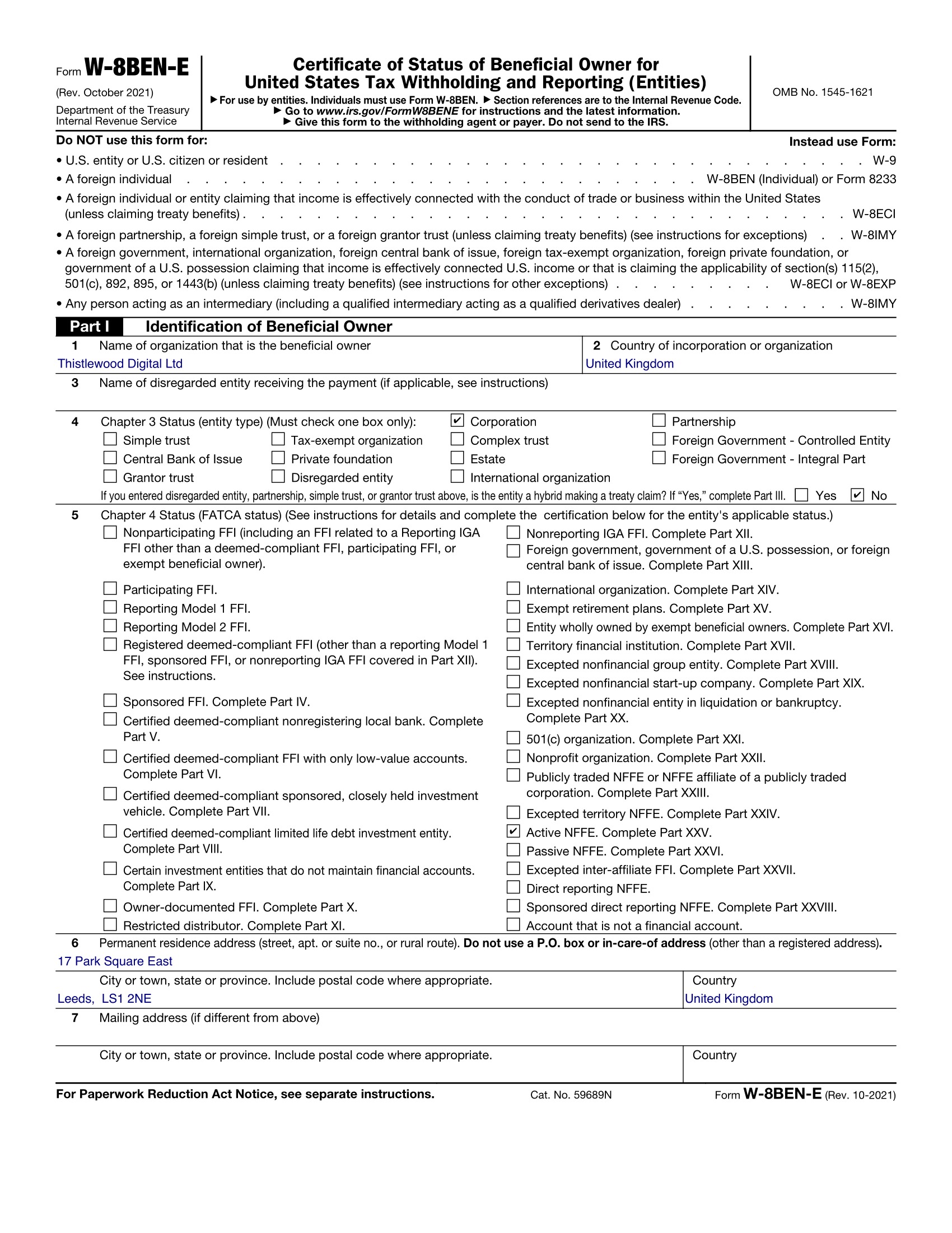
Example only. Thistlewood Digital Ltd, 17 Park Square East, Leeds LS1 2NE, is fictional.
FAQ
Do Upwork companies need W-8BEN-E?
Usually yes when disbursements are made to a foreign legal entity rather than an individual operating in their own name. Upwork’s tax collection flow is designed to align with IRS withholding documentation rules for entities. Sole proprietors and freelancers paid personally typically use Form W-8BEN instead. Compare your Upwork business profile to formation documents—the certificate type should match that entity layer.
Can I use W-8BEN instead?
Only when Upwork pays you as a foreign individual, not as a company. W-8BEN is for natural persons. W-8BEN-E is for foreign entities and includes FATCA sections absent from the individual form. Uploading the wrong certificate can delay verification because automated checks compare entity type to the form type.
What happens if I submit the wrong form?
Upwork may keep default withholding positions on documented payment types, delay payouts, or request corrected tax information until the profile is internally consistent. Exact messages depend on account mode and region, but the root issue is usually a mismatch between legal entity type and the certificate on file.
Does Upwork report to the IRS?
Not for a documented foreign company doing the work outside the US. Upwork issues Form 1099-K on the basis of Form W-9, i.e. to US persons. Your W-8BEN-E in Manage finances › Tax information certifies the company is foreign, and fees for services performed outside the US are foreign-source, so there is no US tax to withhold either.
How long is the form valid?
Generally, a signed W-8BEN-E remains valid until the last day of the third calendar year after signing unless a change in circumstances makes it incorrect earlier. Submit a new form when legal name, address, classification, treaty claims, or FATCA status changes. Upwork may also prompt for refresh independent of the IRS validity window.
Where do I add W-8BEN-E in Upwork?
In Manage finances › Tax information. Upwork collects the form online in your account — there is no PDF to upload. Keep your prepared W-8BEN-E as a reference so the legal name, country of incorporation and line 9b tax number you enter match your company documents.
Does a valid W-8BEN-E guarantee zero US withholding on Upwork payouts?
For work performed outside the US, in effect yes: that income is not US-source, so there is no US tax to withhold and no treaty claim is needed. It stops holding if facts change — staff working from the US make part of the income US-source — or if the form lapses. A W-8BEN-E is valid until the end of the third calendar year after the year you sign it.
My agency is non-US with no US employees—which form should we submit?
If Upwork pays your foreign company and your account is set up as a business entity, you typically submit W-8BEN-E. Lack of US employees is relevant to many analyses, but it is not the only factor—contracts, payment classification, and any US operations still matter. When facts are unclear, get professional advice before certifying.
Related links
Need the full W-8BEN-E overview without the Upwork framing? Open our main entity landing for deeper context on Chapter 3, Chapter 4 (FATCA), and withholding mechanics.
Not running a company account? Use the individual W-8BEN path for freelancers billing in their own name.
Fill your W-8BEN-E for Upwork in minutes
Answer guided questions tailored to foreign companies, then preview the output. The wizard gives you a completed W-8BEN-E PDF. Fill in the form online in Manage finances › Tax information, so you copy the answers line by line and keep the PDF as your record. Plain language, clear checkpoints, and a single $30 checkout for PDF generation—built for agencies that need compliance shipped without turning finance into part-time tax counsel.
Start Now ($30)